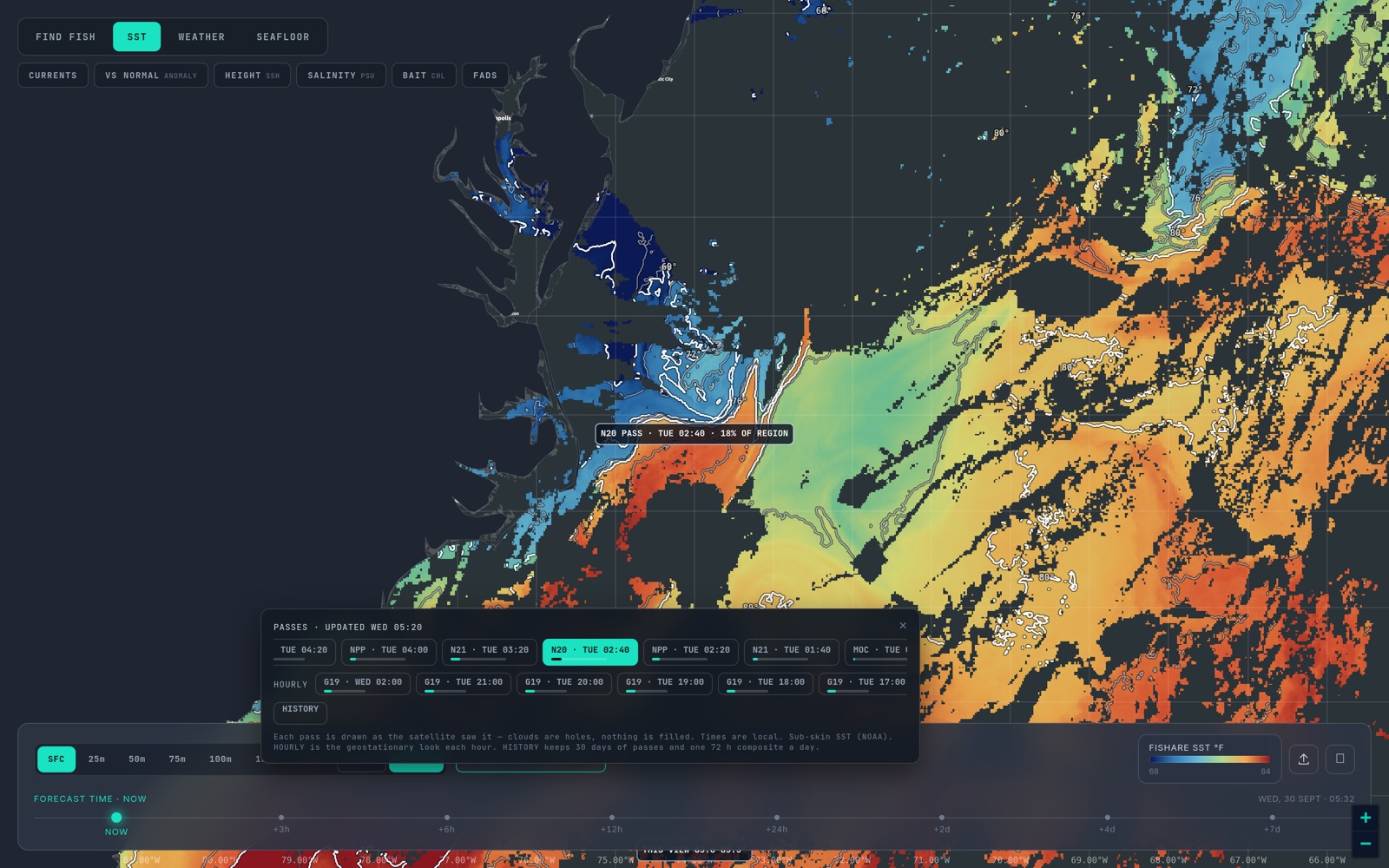
The composite tells you where the water is. The passes tell you when.
Part 3 of six. Each tip ends with a tag such as sst_break_definitionA: the rule it rests on and that rule's confidence grade (A agency or peer-reviewed, B two or more practitioners agree, C one practitioner or anecdote, I a property of our own bake). Tap a tag to read the rule and its sources. Degrees F and miles, as on the US East map.
Cloud is the main reason a satellite chart is hard to use. A single pass over a coast is often half hidden. The fix every serious chart uses is a composite: take several passes, and for each pixel keep the freshest clear one. Fishare builds a 24-hour and a 72-hour composite for every region from real pixels, never a model fill, and labels the 72-hour one cloud-free on the strip. When we shot the US East one on 30 September 2026, the chip read 74 passes: a lot of partial looks folded into one near-complete field. composite_vs_passB
That is genuinely useful. A composite shows you the whole region at once: the full shape of a current, a warm eddy, the line of a shelf edge, and whether a warm finger still connects to the water that feeds it, which an isolated warm patch does not. sst_break_connected_warm_massB It is the right first look.
It also has a cost you should know about.
A composite is a patchwork of different moments
One pixel may be from an hour ago and the one beside it from sixty hours ago. If the water is still, that does not matter. If the water moved, the composite shows a break that is a blend of where it was on Tuesday and where it was on Thursday. It can look softer than the real edge, or smeared, or even sit between two true positions where no edge ever was. The sharp edge belongs to the newest pass. composite_vs_passB
So the workflow is two steps.
- Find the where on the composite. Look for the shapes: the warm tongue, the ring, the shelf edge, the eddy you want to be near.
- Check the when on the passes. Open the strip and pick the newest clear pass over the part you care about. Is the edge where the composite says it is? Open the pass before it. Did it move? Which way, and how far? pass_age_and_freshnessB
How to line two passes up
Compare like with like. Check that the edge was in clear water on both passes: a break that is clear on one pass and under cloud on the next has not moved, you just lost sight of it. cloud_hole_is_missing_not_edgeI Read the same two temperatures off the label on each, so you are following one line and not a different one that happens to be nearby. Note the time on each; two passes a few hours apart are the best pair, and a morning pass against an afternoon pass is a pair to read with Part 4 open. hourly_morning_edgeA Then measure the move in the direction the edge runs, not along it, and project it forward to when you will arrive. sst_break_moves_track_speedB
Watch for seams
Where one pass ends and an older one begins inside a composite, there can be a step in temperature that is not water: the two looks are hours apart. A real break continues across the seam and shows on the passes either side. If you can see a line only on the composite and on no single pass, treat it as a seam until a pass says otherwise. composite_vs_passB This is the same reason the Pass Read needs a break to hold on two passes before it names one. sst_break_persistence_three_daysB
When the composite is the right tool, and when it is not
| You want to | Use |
|---|---|
| See the whole region, plan a direction | The 72-hour composite |
| See today's picture, with gaps | The 24-hour composite |
| Decide whether the edge moved | Two single passes, newest and previous |
| Read the cleanest temperature at one spot | The newest clear pass over it |
| Check a spot you cannot see on the newest pass | The composite, then wait for the next pass |
Two more things a composite is not. It is not the daily analysed field: that one is gap-filled with a model under the cloud, which is why it is always whole, shows zones rather than knife edges, and carries its own date. cloud_free_products_are_modelsB And it is not a forecast. Its newest pixels are from the latest pass, and its oldest are up to three days old. Part 6 is about what to do with the forecast. forecast_vs_observedB
Next: Part 4 — Hourly frames and the morning edge. Back: Part 2. Every region's pass ages are on the status page; the rules tagged above are on How we read SST.
Open the map, turn on PASSES and tap the cloud-free chip. The switching guide covers the composite against what other services call their cloud-free product.