Run your club's
comps — free.
Photo-verified competitions, a live leaderboard, and a season ladder that tallies itself. The format the big tournaments proved — minus the paper score sheets and the volunteer's lost weekend.
Free for clubs. All of it.
Every club gets the whole toolkit — nothing gated, nothing metered. If your club runs comps, Fishare runs them free.
- Unlimited members, competitions and admins
- Photo-verified entries + code word
- Live leaderboard + auto season ladder
- Game-fishing point scores — divisions, line classes, Champion Boat
- Points-per-cm and best-per-species scoring formats
- Moderation queue — approve / deduct / reject, 24h dispute
- Entry & results notifications for members and organisers
- Legal-size + protected-species refusal built in
- Club branding — logo + colours; sponsor logos on comp pages
- Results export (CSV) + embeddable leaderboard for your website
- Junior member aliases
- Paid-entry tournaments run for profit
- Substantial cash prize pools
- Sponsored or branded events run for revenue
- Promoter- or trail-operated series
The tie-breaker: who keeps the money? Entry fees flowing back into prizes, the club or a charity — free. Revenue for a business — licensed. Same tools, plus our help running it.
Talk to us — info@fishare.appA note on members: the club tools above are free for everyone — running comps costs your members nothing. The personal offshore-intelligence layer (live SST, the HSI habitat heatmap, subsurface temps) is Fishare Pro, and every member gets the standard 7-day Fishare Pro free trial, then US$8.99/mo or US$79/yr (A$12.99/mo or A$119/yr in Australia, NZ$14.99/mo or NZ$129/yr in New Zealand, billed in your own currency at checkout) — the same deal any angler gets. No lifetime grants, no fine print.
Four steps. First comp tonight.
Want it done with you? Email info@fishare.app and we'll set your club up together — page, first comp, scoring format, the lot. It usually takes one reply.
Read the guide & FAQ →Trust the result, skip the spreadsheet.
From "create comp" to crowned champion.
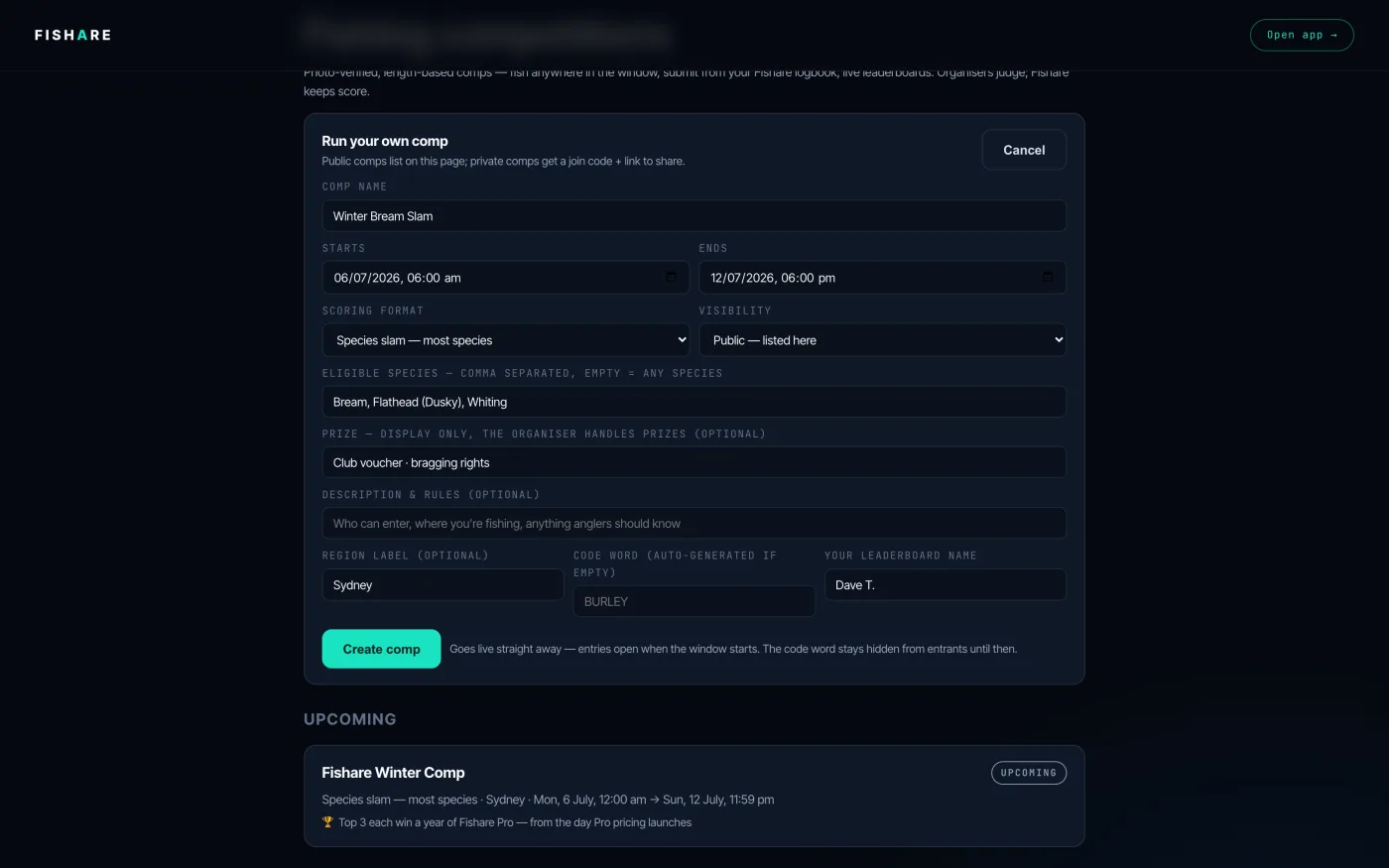
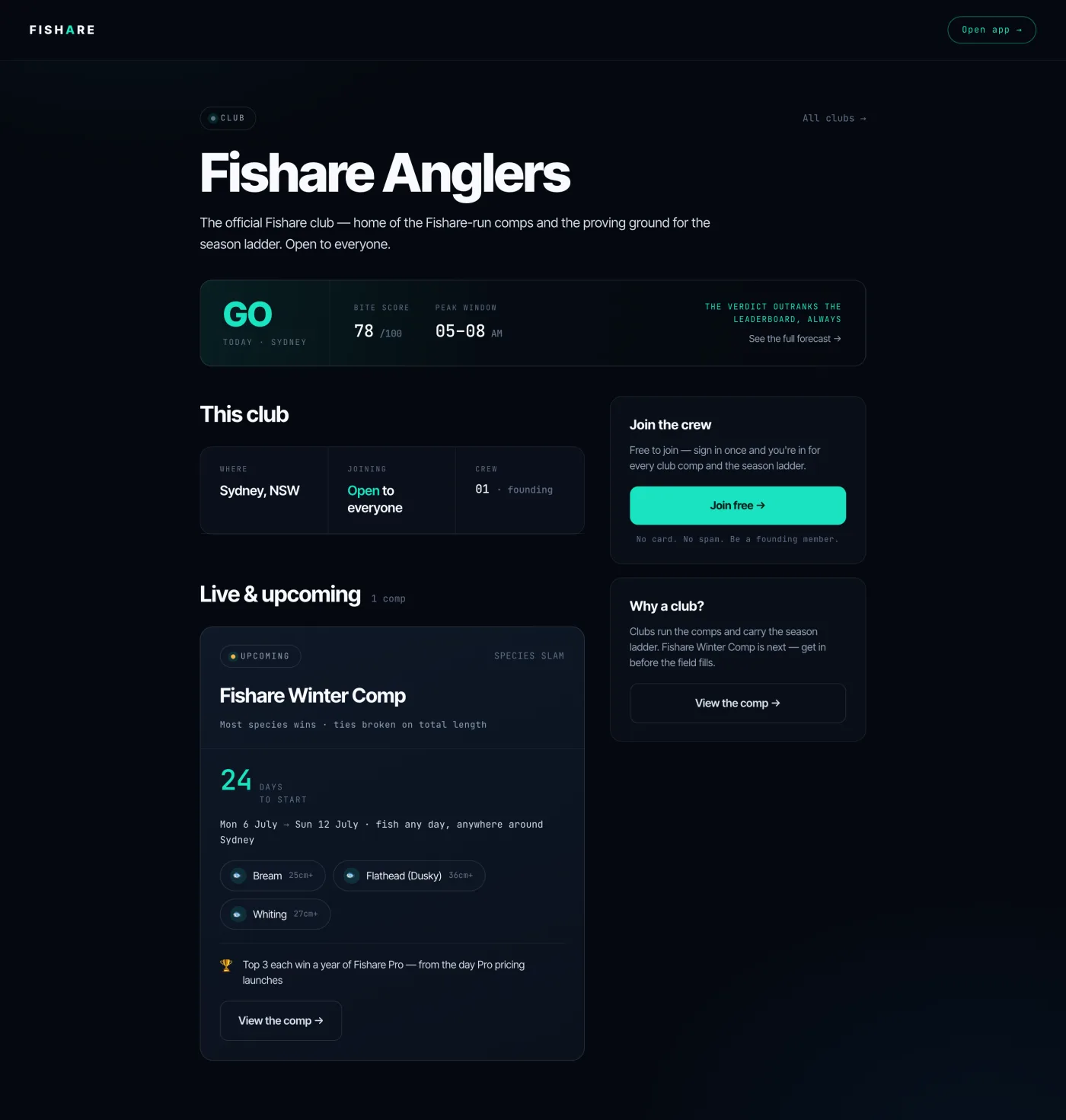
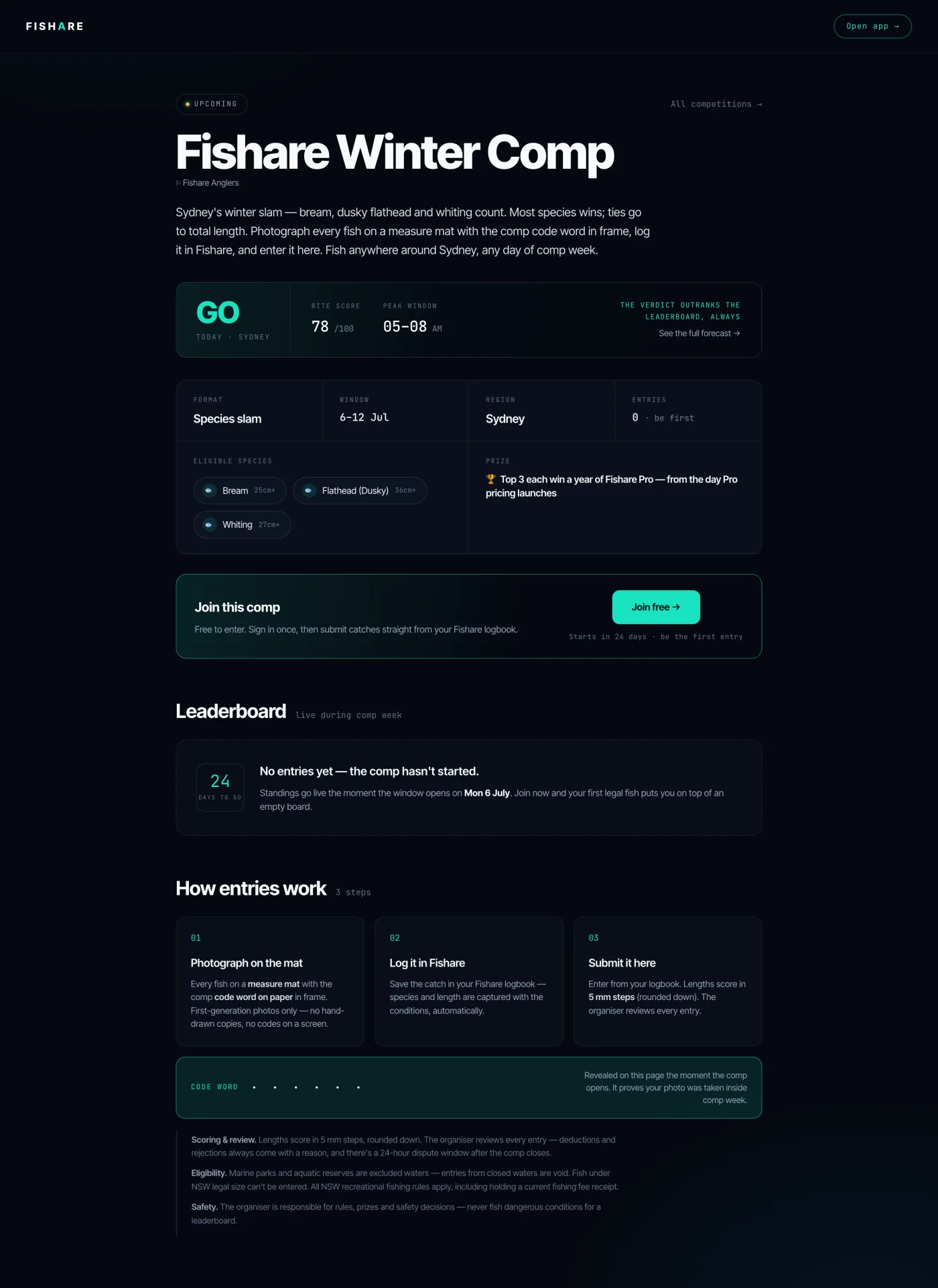
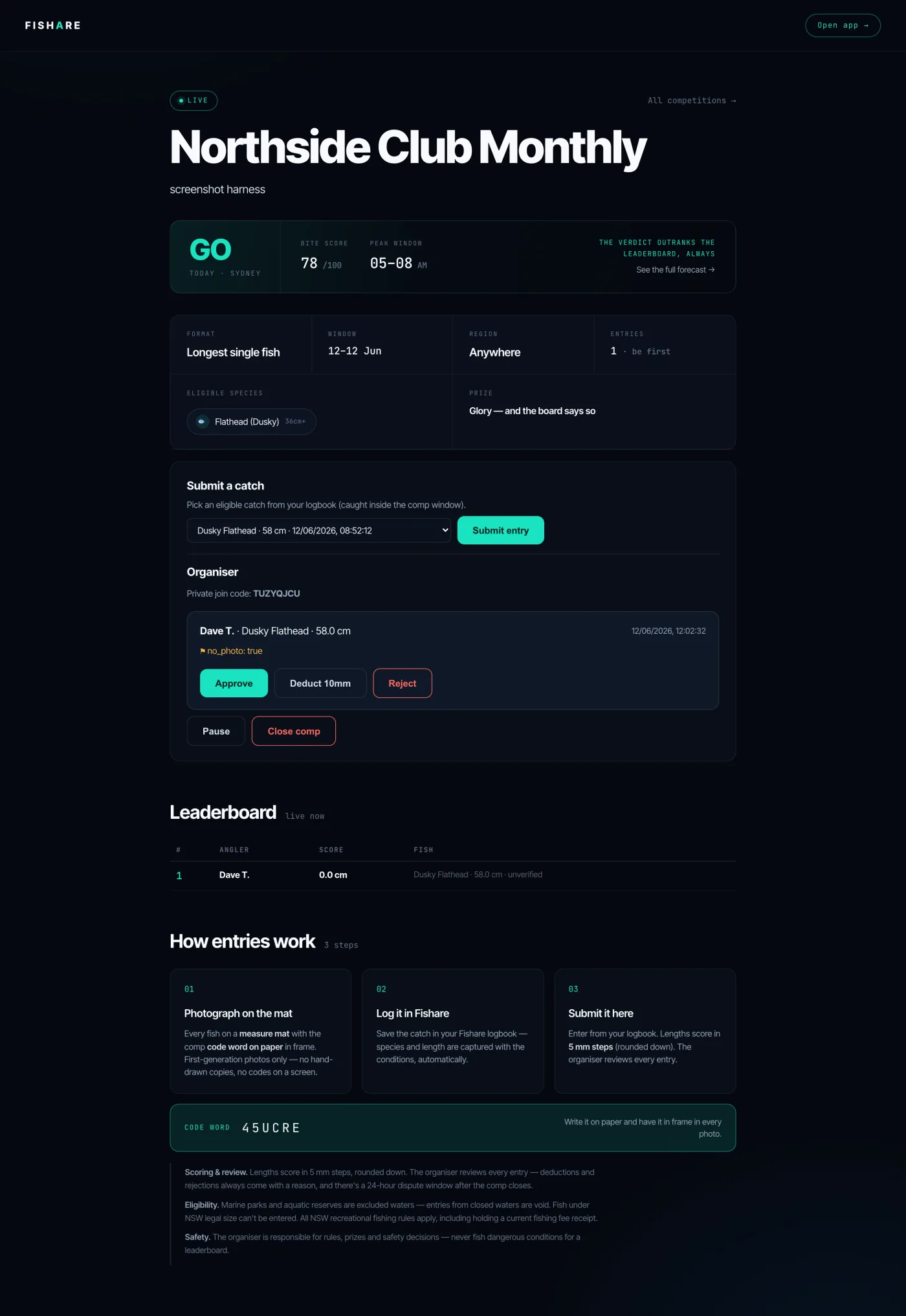
Real screens from the live app — exactly what you and your members get. The 50-second version first, stills below.
Everything your committee needs. Self-service.
Your club, your comps, your members, your rules. This guide plus the FAQ below should answer anything that comes up — bookmark it and share it with your committee.
- 1 · Set up your club
- 2 · Members & joining
- 3 · Run a competition
- 4 · Judging entries
- 5 · The season ladder
- 6 · Game-fishing comps
- 7 · Your website & branding
- 8 · FAQ
1 · Set up your club
- Sign in at fishare.app (free), then go to fishare.app/clubs and hit Create club.
- Pick a name, a location label, and how anglers join — open (anyone), request (you approve), or invite (code only). You can change joining later; the club's web address never changes.
- You get a public club page at fishare.app/clubs/your-club, a starter season ladder, and a welcome email with your setup checklist.
2 · Members & joining
- Invite link & code — your club page has a share button; invite-policy clubs also get a code (shown in your admin panel).
- Aliases — every member picks a display alias when joining. Real names never appear unless the member chooses to use one; that's how junior members stay private on public leaderboards.
- Approve or decline requests — request-policy clubs list pending anglers in your admin panel. Declining lets them ask again later; removing a member is permanent — they can never rejoin.
- Co-admins — the club owner can promote members to admin from the Members panel. Admins can moderate comps, manage members and edit club details; only the owner can rename the club or change joining.
3 · Run a competition
- From your club page admin panel, hit + New club comp. Club comps are members-only by default (untick to open them up) and appear on your club page.
- Pick a format: longest single fish · total length of your best N fish · species slam (most species) · or game-fishing tag & release (points).
- Set the window (up to ~3 months), eligible species (leave empty for any), an optional prize line, and the code word — anglers write it on a slip in their photo so old photos can't be entered.
- The comp goes live immediately with its own page, join link and live leaderboard. Private comps get a join code instead of a public listing.
Get the details right before creating — name, species and start time can't be edited on a live comp yet. If you mis-create one, close it and create a fresh one.
4 · Judging entries
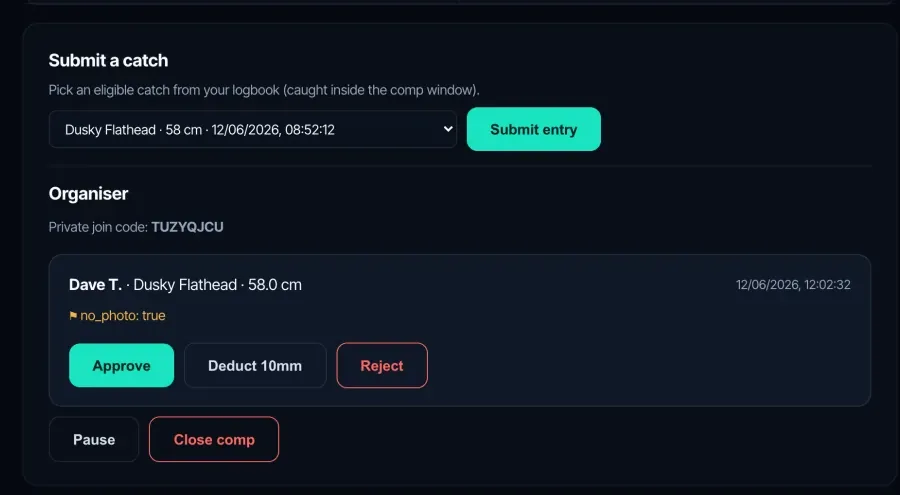
Anglers log catches in the Fishare app as normal; if a catch fits a comp they've joined, they're offered one-tap entry. Every entry lands in your moderation queue on the comp page:
- View the photo — fish on the mat with the code word visible. Fishare also flags entries automatically: no photo, caught-vs-logged time gaps, or caught near a marine reserve.
- Approve, deduct, or reject — deductions and rejections require a written reason, which the angler sees. Every decision is recorded in the audit log.
- Legal sizes are enforced for you — undersize fish (NSW rules) are refused at submission, and protected species can't be entered at all.
5 · The season ladder
Your club has a season ladder that fills itself: when a club comp's results go final, placing points land automatically — 10 for 1st, 7 for 2nd, 5 for 3rd, 1 for entering, by default. Comps you create are attached to the current season automatically when their dates fall inside it.
Want a best-N-rounds season (only each angler's best results count)? That's supported — contact us and we'll set the ladder up that way while the season editor ships.
6 · Game-fishing comps
The tag & release format scores NSWGFA-style points by species group and line class — no fish comes over the side:
- Anglers enter the line class, the DPI tag number, their angler category (adult / junior etc.) and their boat with each entry.
- Lengths are optional — a released marlin scores its points without a measurement; the tape-in-water photo is the evidence.
- Champion Boat standings run automatically once at least two anglers have entered fish from the same boat on the same day.
7 · Your website & branding
- Embed your ladder — the admin panel has a copy-paste iframe snippet that puts your live season ladder (or any comp leaderboard) on your club's own website.
- Club badge — add a logo URL in Club settings; it shows on your club page.
- Sponsors — up to eight sponsor logos with links, shown on your club page and every comp page.
The questions every club asks.
What does Fishare cost our club?
Do our members have to pay?
How do anglers enter a catch into our comp?
What makes a valid entry photo?
What if someone submits a dodgy entry?
An angler disagrees with a result — what happens?
Can anglers enter catches when they have no phone signal?
Can we edit a comp after creating it?
How do season points work?
Can juniors compete without their names being public?
How do we get results onto our own club website?
Who can moderate — just one person?
How does tag & release scoring work for game fishing?
What fishing rules does Fishare enforce?
Can we run a members-only comp?
Will anyone tell us when something needs doing?
Something's not covered here — who do we ask?
Bring your club's next comp to Fishare.
Set up your club page in minutes — free, and we'll help. Or just reply to our email and we'll do it with you.
Create your club →Questions first? The FAQ above covers scoring, judging and the fine print.